Setting up GA4 For WordPress
Adding Google Analytics 4 (GA4) to your WordPress site can provide several benefits:
- Advanced Tracking Capabilities: GA4 offers enhanced tracking capabilities compared to its predecessor, Universal Analytics. It leverages event-based tracking and machine learning to provide deeper insights into user behavior and engagement on your website.
- Cross-Platform Tracking: GA4 allows you to track user interactions across multiple platforms and devices, including websites, mobile apps, and even offline interactions. This holistic view helps you understand the complete user journey and make data-driven decisions accordingly.
- Enhanced Ecommerce Tracking: If you run an online store using WordPress, GA4 provides improved ecommerce tracking features. It enables you to track and analyze various aspects of your ecommerce activities, such as product views, purchases, and cart abandonment, to optimize your online sales funnel.
- Future-Proofing: As Google’s latest analytics platform, GA4 is likely to receive ongoing updates and support. By integrating it with your WordPress site, you ensure that you’re using the latest tools and features to measure and analyze website performance.
- Privacy and Data Protection: GA4 is designed to comply with stricter privacy regulations, such as GDPR (General Data Protection Regulation) and CCPA (California Consumer Privacy Act). It allows you to customize data collection settings, implement user consent mechanisms, and respect user privacy preferences, helping you maintain compliance with data protection laws.
- Deeper Insights and Reporting: GA4 provides an improved user interface and reporting dashboard that offers more in-depth insights into your website’s performance. It includes enhanced data visualization, exploration, and analysis tools, enabling you to understand user behavior, identify trends, and make informed decisions to optimize your WordPress site.
- Integration with Google Ads: GA4 seamlessly integrates with Google Ads, allowing you to measure the performance and impact of your advertising campaigns. You can track conversions, analyze user behavior after clicking on ads, and optimize your ad spend based on valuable insights provided by GA4.
Setting up GA4 for WordPress
- Login and setup a new property in google analytics (here is step by step to get you to the right point). Get to the Data collection (step 7 in my step by step:

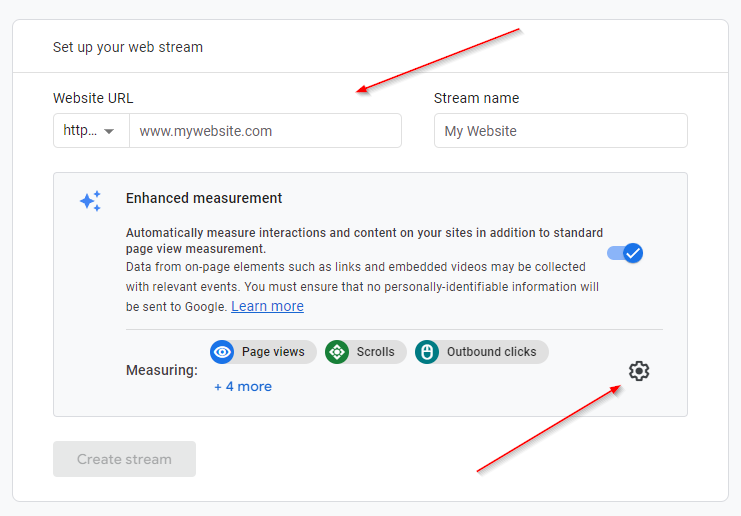
- Select Web for your platform and then enter in the URL (minus the https) in the Website URL and then click on the gear to finetune the measurements that that you want to collect.